

How to Know If Your Phone Supports eSIM
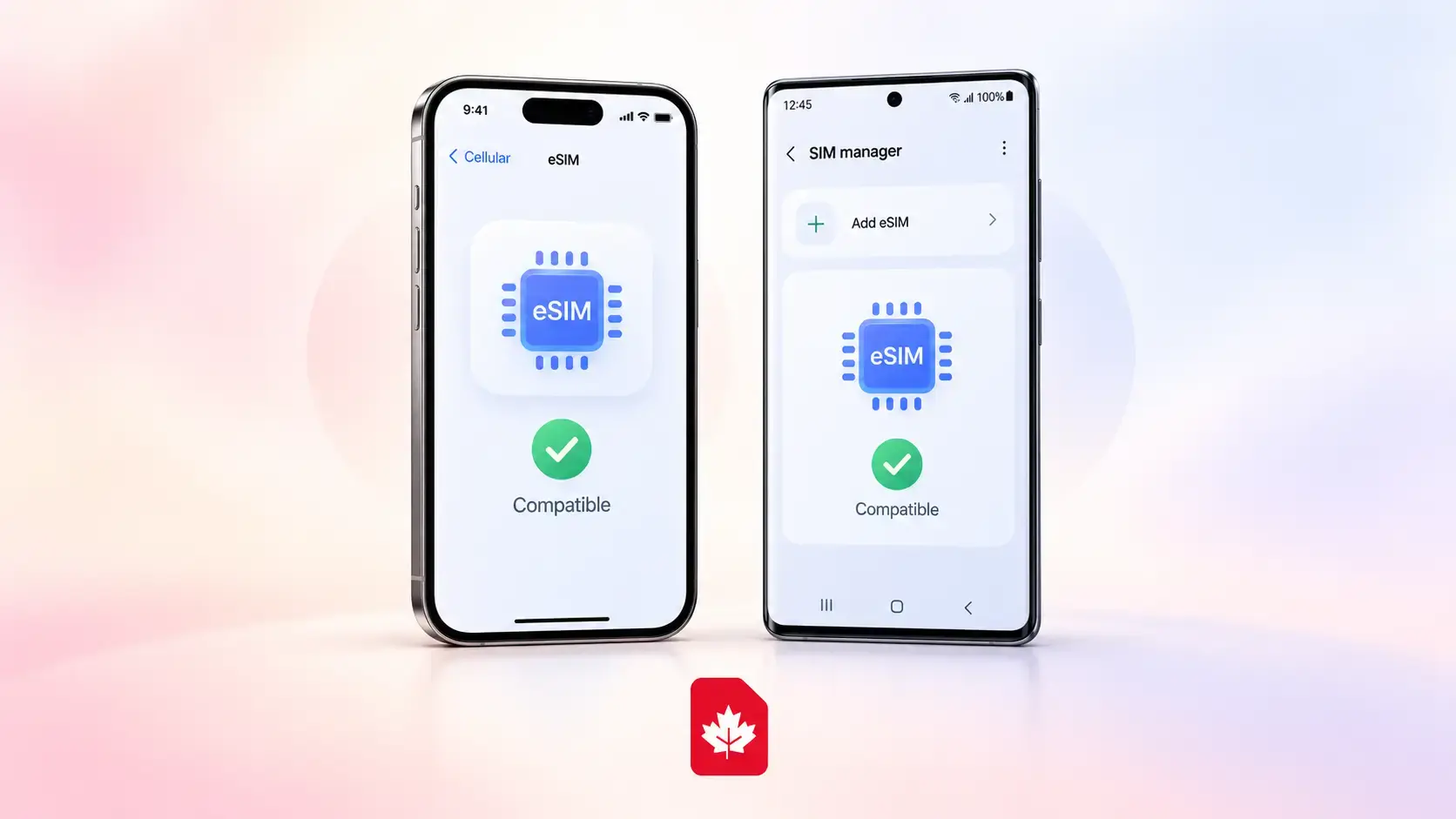
If you are wondering “How do I know if my phone supports eSIM?”, there are three quick things to check: look for an EID number, see whether your phone has an Add eSIM option in Settings, and confirm the specifications for your exact phone model.
The fastest check on many phones is to dial *#06#. If the device-information screen shows an EID, that is a strong sign that your phone has built-in eSIM capability. You can also open your mobile or SIM settings and look for options such as Add eSIM, Add Cellular Plan, Download SIM, or SIM Manager.
Do not rely only on the name of your phone. An iPhone, Samsung Galaxy, or Android device may have different SIM features depending on its model number, country of sale, or regional version.
If you are checking because you plan to use an eSIM in Canada, you can also review GetCanadaSIM and the Canada eSIM guide after you confirm that your device is compatible.
Quick answer:
Your phone probably supports eSIM if it has an EID and an “Add eSIM” or similar option in its mobile settings. But you should still check the exact model and make sure the phone is carrier-unlocked before choosing an eSIM.
 |
 |
|---|
How Can I Tell If My Phone Has an eSIM?
If you want to check whether your phone supports eSIM, start with the phone itself rather than searching only by model name.
The quickest method is:
- Dial *#06# and look for an EID.
- Open your SIM or mobile-network settings and look for Add eSIM, Add Cellular Plan, Download SIM, or a similar option.
- Find your exact model number and compare it with the manufacturer's official specifications.
An EID, or Embedded Identity Document number, is associated with the eSIM built into a compatible device. Google, for example, explains that a phone needs an EID to use an eSIM.
If you see only an IMEI, that does not by itself prove your phone supports eSIM. We explain the difference between EID, IMEI and ICCID later in this guide.
Also, do not assume that the absence of an EID on the *#06# screen automatically means your phone cannot use eSIM. Menus and identifier displays can differ by device. Check Settings and your manufacturer's documentation as well.
If you are new to the technology itself, see what an eSIM is and how eSIM works in Canada before choosing a plan.
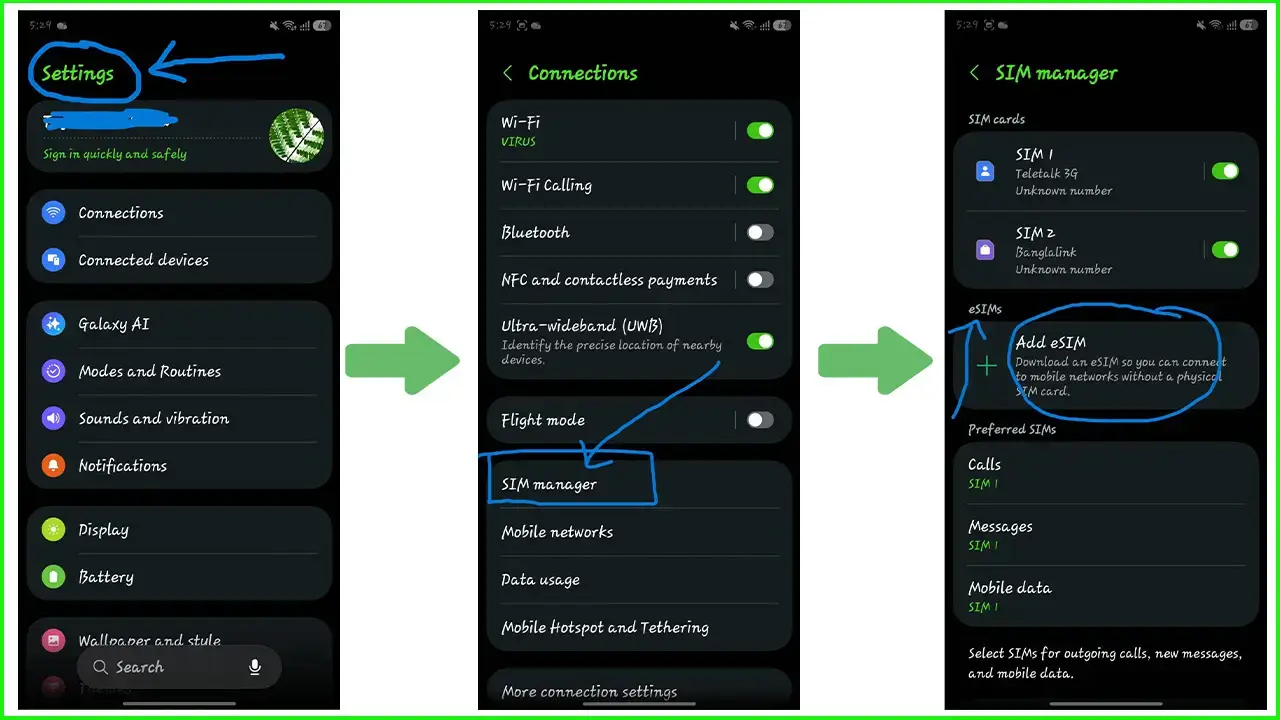
How Do I Know If My iPhone Supports eSIM?
For an iPhone, checking eSIM compatibility is usually straightforward.
Open:
Settings → Cellular / Mobile Data
Look for an option such as:
Add eSIM
You can also go to:
Settings → General → About
and look for an EID.
Apple's current guidance says eSIM setup is supported on iPhone XS, iPhone XS Max, iPhone XR and later models, although availability can differ in some countries and regional versions.
That means simply owning a fairly recent iPhone is a useful first clue, but checking the exact device remains the safer approach.
What Is the Oldest iPhone That Supports eSIM?
The earliest iPhone generation Apple currently lists for eSIM support includes the:
| iPhone | eSIM support |
|---|---|
| iPhone XS | Yes, subject to region/carrier support |
| iPhone XS Max | Yes, subject to region/carrier support |
| iPhone XR | Yes, subject to region/carrier support |
| Later compatible iPhones | Generally supported, with regional exceptions |
Apple specifically lists iPhone XS, XS Max and XR or later in its current eSIM requirements.
Regional differences matter. Apple notes, for example, that eSIM availability on iPhones sold for mainland China differs from many other markets, while some Hong Kong and Macao models have different physical-SIM configurations.
So if your question is simply “Does my iPhone support eSIM?”, the model name is a good starting point, but the model number and region of purchase provide the safer answer.
How Can I Check If My iPhone Is Unlocked?
Supporting eSIM and being unlocked are two different things.
On iPhone, go to:
Settings → General → About → Carrier Lock
If you see No SIM restrictions, Apple says the iPhone is unlocked. Only the current carrier can unlock a carrier-locked iPhone.
This matters because an eSIM-compatible iPhone can still be unable to use another carrier's service if it remains locked.
How to Check If Your Samsung Phone Supports eSIM
If you are asking “Does my Samsung phone support eSIM?”, start in:
Settings → Connections → SIM Manager
Look for:
Add eSIM
Samsung's current instructions use this path for compatible Galaxy devices.
If the option appears, your Samsung has eSIM functionality available under its current device configuration. You can also check for an EID and confirm your exact Samsung model number.
Samsung's current compatibility information includes many recent Galaxy S-series phones, Galaxy Z Fold and Z Flip devices, selected Galaxy FE and A-series models, XCover devices and cellular tablets. However, Samsung explicitly warns that eSIM support can vary by country of origin even when the model family appears on its supported-device list.
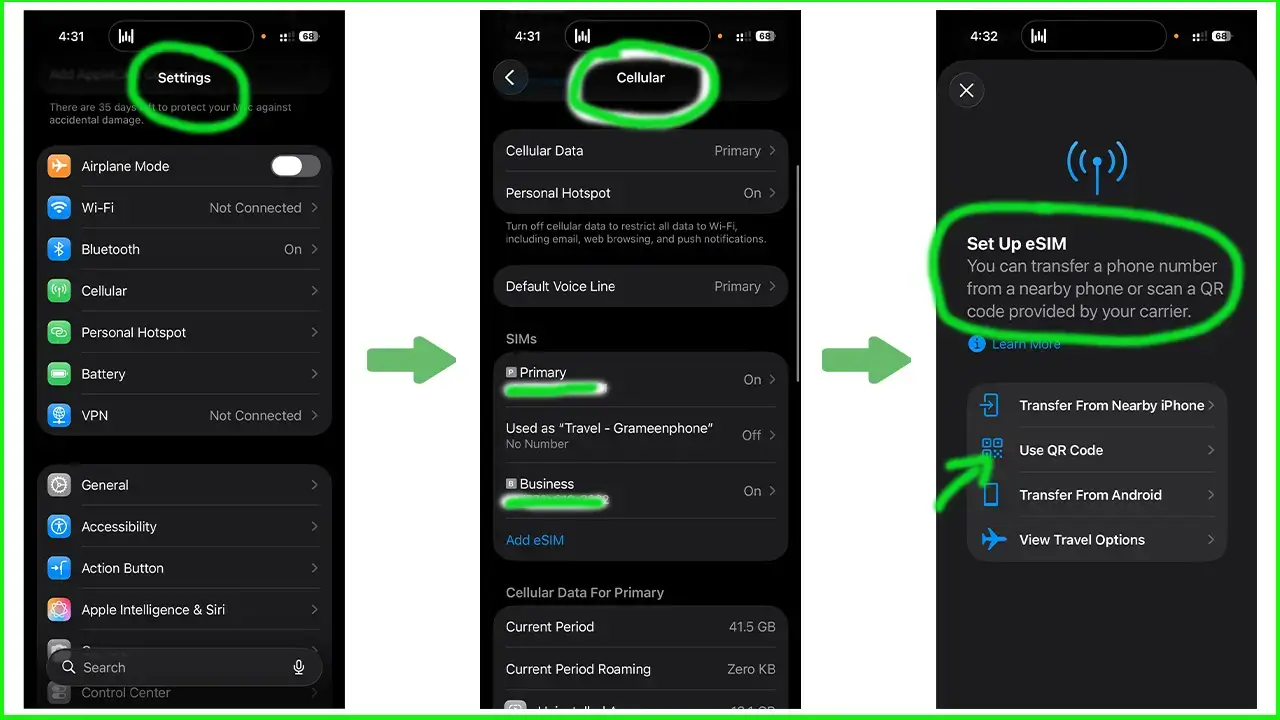
Let's check whether your Samsung phone supports eSIM or not-
Step 1: Go to Settings
Step 2: Now, go to Connection
Step 3: Tap on the SIM Manager
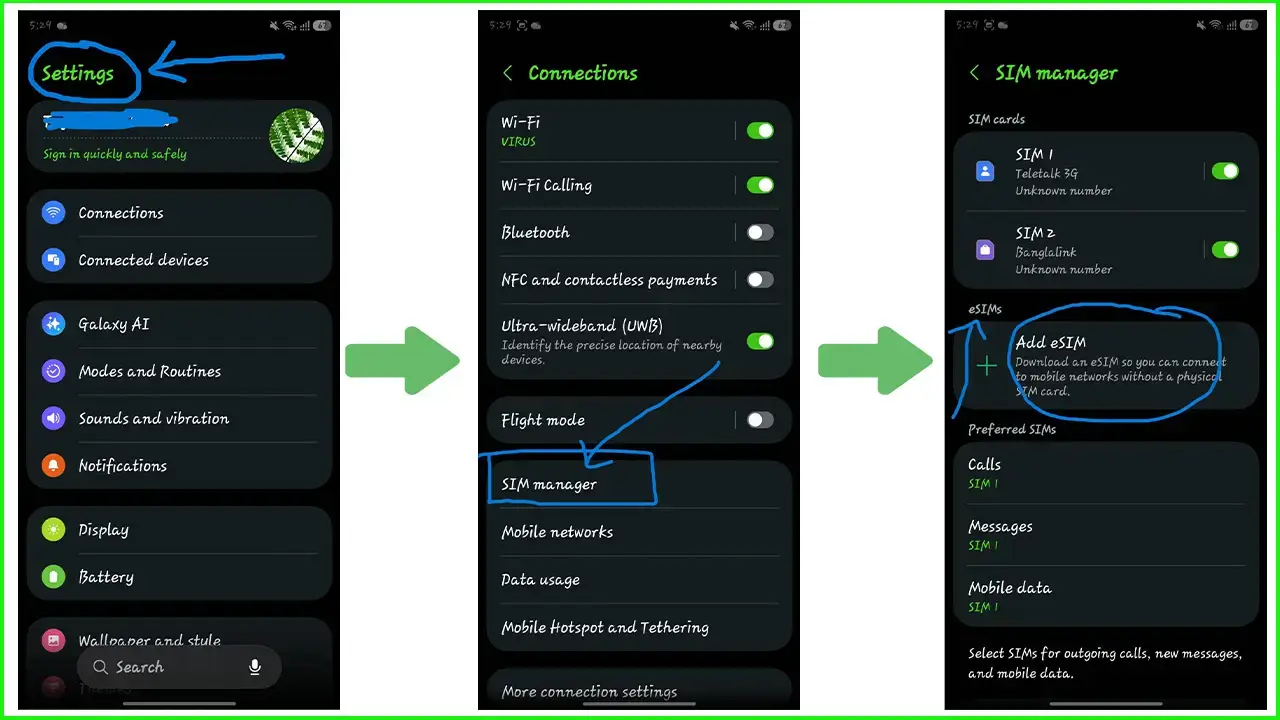
Boom, now you can see whether your Samsung phone is eSIM supported or not.
That regional warning is important.
For example, searching only:
“Samsung Galaxy A54 eSIM support”
may not be enough. You should check the exact A54 regional version because Samsung lists eSIM availability for that model only in certain markets.
Why Can Two Samsung Phones With the Same Name Have Different eSIM Support?
Manufacturers sometimes sell different versions of the same phone family in different markets. Those versions can have different hardware, SIM arrangements or carrier support.
That is why an online Samsung eSIM support list should be treated as the beginning of the check, not the final confirmation.
Your safest combination is:
model name + model number + region + Add eSIM setting + EID
If all of those point to eSIM support, you have much stronger confirmation than you would get from the marketing name alone.
How Do I Know If My Android Phone Supports eSIM?
There is no single eSIM menu that applies to every Android phone.
If you want to check eSIM support on Android, open Settings and search for terms such as:
eSIM, SIM, SIM Manager, Mobile Network, Network & Internet, Add SIM, or Download SIM.
Different Android manufacturers use different wording.
For example, Samsung currently uses:
Settings → Cellular→ Set Up eSIM
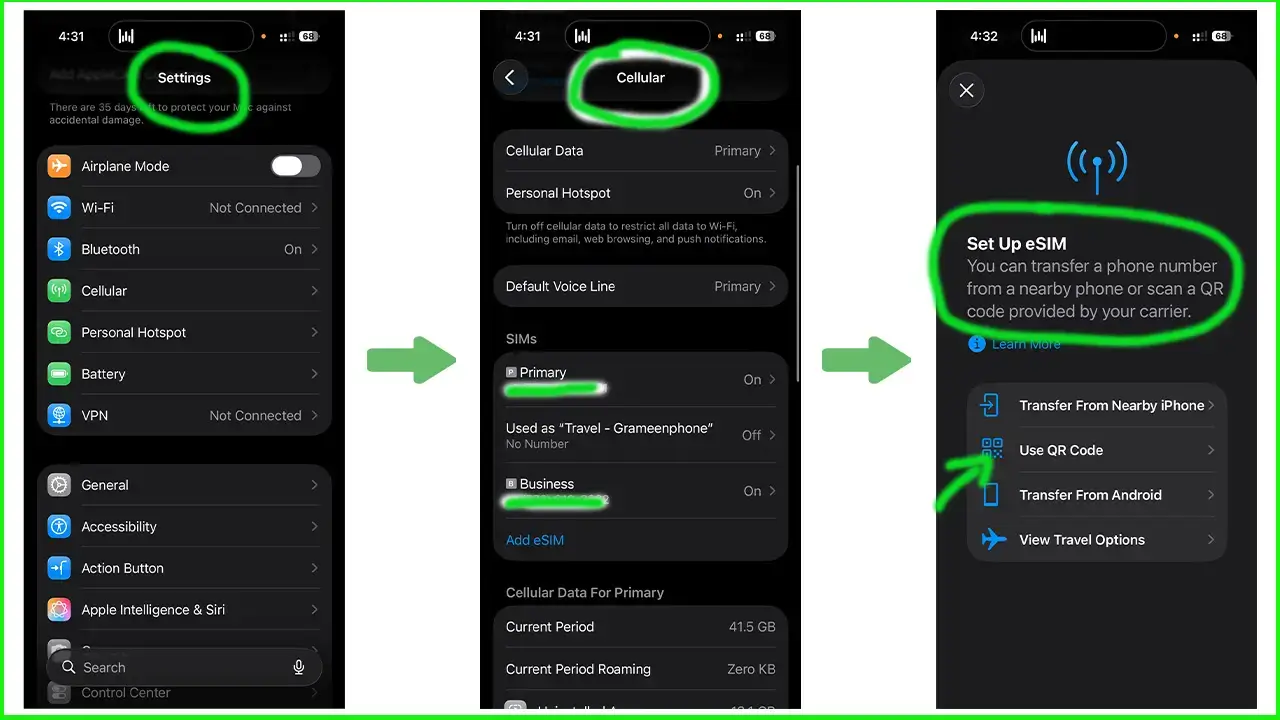
Google Pixel uses its Network & Internet → SIMs area for SIM and mobile-network management.
Huawei also uses SIM-management settings on compatible devices, although Huawei states that eSIM availability depends on the device, country and network provider.
So when someone asks “How do I know if my Android phone supports eSIM?”, the most reliable answer is not simply “check whether it is Android.” You need to check the manufacturer, exact model, regional version and mobile-network settings.
How to Check eSIM Support on a Google Pixel
Google provides unusually clear compatibility information for Pixel devices.
Google currently says:
| Google Pixel generation | eSIM situation |
|---|---|
| Pixel 4 and later | All models support eSIM |
| Pixel 3a | Supports eSIM with some regional/carrier exceptions |
| Pixel 3 | Support depends on where and how it was purchased |
| Pixel 2 | Only certain Google Fi models support eSIM |
| Original Pixel (2016) | Does not support eSIM |
For recent Pixel phones, open:
Settings → Network & Internet → SIMs
and look for the option to add or manage a SIM. Google also notes that eSIM functionality can depend on both the phone and mobile carrier.
This is a good example of why searching for an Android phone eSIM support list can be useful, but model-specific manufacturer information is better.
Which Phones Are eSIM Compatible?
There are now many eSIM-compatible phones, but support is still not universal.
Here is a useful brand-level overview:
| Brand | General eSIM situation | What you should verify |
|---|---|---|
| Apple iPhone | XS, XS Max, XR and later are the main eSIM generations | Exact model and region |
| Samsung Galaxy | Many recent S, Z, FE, A and other selected devices | Exact model number and country |
| Google Pixel | Pixel 4 and later broadly support eSIM; older Pixels vary | Generation and purchase region |
| Huawei | Selected phones support eSIM | Exact model, region and carrier |
| Other Android brands | Increasingly common but not universal | Manufacturer specification |
Apple's current requirement begins with the iPhone XS/XS Max/XR generation. Samsung maintains a much broader model list but warns about country variations, while Google's Pixel documentation provides model-specific exceptions for older Pixels.
The important lesson is simple:
Do not assume that every modern smartphone supports eSIM.
Even when a phone family is generally compatible, the exact model sold in your country may be different.
What Phones Cannot Use eSIM?
A phone generally cannot use an eSIM if it has no embedded eSIM hardware or if that particular regional version does not enable the feature.
Older phones are more likely to fall into this category, but age alone is not enough to decide.
For example, Apple's current eSIM requirement starts with the iPhone XS/XS Max/XR generation, so earlier iPhone generations are outside that supported starting point. Google's original Pixel does not support eSIM, while several early Pixel generations have carrier or regional restrictions.
A phone may also appear incompatible because it is carrier-locked, even though the hardware itself supports eSIM.
So there are two different questions:
| Question | Meaning |
|---|---|
| Does the phone have eSIM hardware? | Whether the device itself can store an eSIM profile |
| Can I use another carrier's eSIM on it? | Depends additionally on lock status, provider and network compatibility |
That distinction prevents a common mistake: deciding that eSIM “doesn't work” when the real problem is a carrier lock or regional restriction.
How Do I Know If I Have an eSIM or a Physical SIM?
A physical SIM is a removable card placed in your phone's SIM tray.
An eSIM, or embedded SIM, is built into the phone. Instead of inserting a card, a mobile service profile is installed digitally.
If you can remove a small SIM card from your phone's SIM tray, that line is using a physical SIM.
If your mobile line appears in your phone's SIM or cellular settings without a removable card for that line, it may be using an eSIM profile.
Some phones can have both at the same time.
| Physical SIM | eSIM |
|---|---|
| Removable plastic card | Built into the device |
| Inserted into SIM tray | Mobile profile installed digitally |
| Can physically move between compatible devices | Usually transferred or reissued digitally |
| Requires a SIM slot | Requires eSIM-capable hardware |
If you want a more detailed explanation, see What Is an eSIM in Canada?.
What Is an EID and Why Does It Matter?
EID stands for Embedded Identity Document.
In simple terms, it is an identifier associated with the eSIM hardware inside a compatible device.
This makes the EID particularly useful when trying to answer:
“How can I tell if my phone has an eSIM?”
Google states that a phone needs an EID to use an eSIM.
Do not confuse it with the other identifiers you may see on your phone.
| Identifier | What it identifies |
|---|---|
| EID | The device's embedded SIM/eSIM system |
| IMEI | The mobile device or cellular radio |
| ICCID | A particular SIM or eSIM profile |
The practical point is that an EID is more useful than a normal IMEI when you are specifically checking for eSIM capability.
Does Seeing an IMEI Mean My Phone Supports eSIM?
No.
An IMEI does not automatically mean your phone supports eSIM.
Phones use IMEI numbers for identification on mobile networks whether they rely on physical SIMs, eSIMs or both.
For eSIM, the important additional identifier is the EID. Google specifically distinguishes the IMEI from the EID and explains that an EID is needed for eSIM use.
So if you dial *#06# and see:
IMEI: yes EID: no
do not immediately conclude either way. Check your SIM settings and exact manufacturer specifications before deciding.
Why Doesn't My Phone Show “Add eSIM” Even Though the Model Supports It?
This is one of the most useful troubleshooting questions because a model name alone does not tell the whole story.
Your phone may belong to an eSIM-capable product family but still have a different regional version. Samsung explicitly notes that eSIM may not be supported in every country of origin even when the device appears on its general compatibility list. Apple also documents regional differences for certain iPhone markets.
Other possibilities include your phone's software version, carrier configuration or lock status.
Before deciding that your phone cannot use eSIM, confirm:
exact model number → country/region → latest software → carrier lock → manufacturer's eSIM specification
This is also why forum answers, including Reddit discussions, can be helpful for finding people with the same model but should not be your final compatibility source. Someone may own a version of the “same” phone that was manufactured for a different region.
My Phone Shows “Add eSIM.” Will It Work With Any eSIM?
Not necessarily.
Seeing Add eSIM is a strong sign that your phone supports the technology, but successful service also depends on the network provider, phone lock status and compatibility of your exact device.
Samsung notes that eSIM service varies by country and carrier. Google similarly says eSIM use can depend on the phone and mobile carrier.
If you want to use another carrier's service, your phone may also need to be unlocked.
For Canada specifically, check the device first, then review current Canada SIM and eSIM plans and confirm the conditions for the plan you are considering.
Does My Phone Need to Be Unlocked to Use an eSIM?
If you want to use an eSIM from a carrier other than the carrier your phone is locked to, the device generally needs to be carrier-unlocked.
An eSIM-compatible phone and an unlocked phone are not the same thing.
Your phone could have the correct eSIM hardware but still reject another network because of a SIM lock.
Apple says an unlocked iPhone shows No SIM restrictions beside Carrier Lock in Settings → General → About. Google likewise explains that a SIM-unlocked Pixel can be used with another mobile provider, while a locked phone may be restricted to the provider that sold it.
If you are preparing to use another mobile service while travelling, check the lock before departure rather than discovering it during activation.
Can I Use an eSIM and Physical SIM at the Same Time?
On many compatible smartphones, yes.
This is commonly called Dual SIM. Depending on the phone, you may be able to use a physical SIM together with an eSIM, or use two active eSIMs.
Apple says supported iPhones can use two active eSIMs in certain configurations and can store multiple eSIM profiles. Google also supports physical-SIM-plus-eSIM configurations on many Pixel devices.
This setup can be useful when travelling because you may want to keep your existing home-country line while adding another mobile line.
If that is your goal, read the Dual SIM guide for Canada before changing your data or roaming settings.
What Is an eSIM?
An eSIM, short for embedded SIM, is a digital SIM built into a compatible device.
It performs the basic role that a physical SIM performs—allowing a mobile plan to be associated with your phone—but the SIM profile is installed digitally instead of by inserting a plastic card.
The eSIM itself is not the mobile plan or the mobile network. Your device, provider and chosen plan still need to be compatible.
That distinction matters when comparing a travel eSIM, Canadian eSIM, prepaid eSIM or regular carrier plan. “eSIM” describes the SIM technology, not everything included with the service.
For a full explanation covering setup, activation, Dual SIM and Canadian use, see the GetCanadaSIM eSIM explainer.
What Should I Check Before Using an eSIM in Canada?
Finding out that your phone supports eSIM is only the first compatibility check.
Before choosing a Canadian eSIM, confirm the phone's exact model number, eSIM capability, carrier-unlocked status and network compatibility. Then compare what the selected mobile plan actually includes.
GetCanadaSIM's eSIM Canada page explains the current eSIM option, while the plans page lets you review current plan details.
If you prefer to understand the process before selecting a plan, see how GetCanadaSIM activation works or check the eSIM and device FAQ.
The important order is:
Check the phone first → understand the SIM format → review activation → compare the plan.
That avoids choosing an eSIM first and discovering a compatibility problem afterward.
eSIM Compatibility Checklist
Before you buy or activate an eSIM, check these points:
- EID: Does your device show an EID?
- eSIM setting: Can you find Add eSIM, Add Cellular Plan, Download SIM or a similar option?
- Exact model: Have you checked the full model number rather than only the phone name?
- Regional version: Was your model sold in a region where eSIM is supported?
- Carrier lock: Is the phone unlocked if you want to use another provider?
- Network compatibility: Does the exact model support the network you plan to use?
- Plan compatibility: Does the selected carrier and mobile plan support eSIM for your device? [VERIFY GetCanadaSIM plan-specific compatibility before publication]
If one of these checks is unclear, confirm it before purchasing rather than assuming that a recent phone will work.
Frequently Asked Questions About eSIM-Compatible Phones
How do I know if my phone supports eSIM?
Check whether your phone has an EID, look in Settings for an Add eSIM or similar option, and verify the specifications for your exact phone model and region. An EID is one of the strongest indicators that the device has eSIM capability.
How can I tell if my phone has an eSIM?
Check the phone's SIM or mobile-network settings. An installed eSIM normally appears as a digital mobile line rather than as a removable card. You can also check for an EID.
How do I check eSIM support on an iPhone?
Open Settings → Cellular/Mobile Data and look for Add eSIM. You can also check Settings → General → About for device information. Apple currently lists iPhone XS, XS Max, XR and later as its main eSIM-supported generations, subject to regional differences.
How do I check eSIM support on a Samsung phone?
Go to Settings → Connections → SIM Manager and look for Add eSIM. Then verify your exact Galaxy model because Samsung says support can vary by country and device version.
How do I check eSIM support on Android?
Search your Settings for eSIM, SIM Manager, Mobile Network, Network & Internet, Add SIM or Download SIM. Android menu names vary by manufacturer, so verify the exact device on the manufacturer's website.
Does *#06# tell me if my phone supports eSIM?
On many phones, dialing *#06# opens device identifiers. If an EID appears, that strongly indicates eSIM capability. If it does not appear, also check Settings and your exact phone specifications before concluding that eSIM is unsupported.
What does EID mean on a phone?
EID is the Embedded Identity Document identifier associated with eSIM functionality. Google explains that a phone needs an EID to use an eSIM.
What is the oldest iPhone that supports eSIM?
Apple currently lists iPhone XS, iPhone XS Max and iPhone XR as the starting iPhone generation in its eSIM requirements. Regional restrictions can still apply.
Which phones are eSIM compatible?
Many recent iPhones, Samsung Galaxy devices, Google Pixel phones and selected Android devices support eSIM. Compatibility varies by exact model and region, so use the manufacturer's current specification rather than assuming all newer phones support it.
What phones cannot use eSIM?
Phones without embedded eSIM hardware cannot use eSIM. This includes many older devices and some regional versions of otherwise compatible phone families. Apple's current general support begins with the iPhone XS/XS Max/XR generation, while Google documents several limitations among early Pixel models.
Can an unlocked phone still not support eSIM?
Yes. Unlocked means the phone can accept service from another compatible carrier. It does not mean the phone contains eSIM hardware. A phone can be fully unlocked and still support only a physical SIM.
Why can't I see Add eSIM on my phone?
Possible reasons include an unsupported device, regional model differences, carrier restrictions or device configuration. Check the exact model number and the manufacturer's official eSIM documentation.
Can I use an eSIM and physical SIM together?
Many modern devices support this through Dual SIM, but the exact combination and number of active lines depend on the phone. Check the specifications for your model before relying on a particular setup.
Can I use a Canadian eSIM on a phone bought outside Canada?
Potentially, yes. The phone needs the required eSIM capability and network compatibility, and it may need to be carrier-unlocked. Because regional models vary, check the exact phone rather than only the brand or model family.
The Simple Answer: Check the Phone Before You Choose the eSIM
If you remember only one thing from this guide, make it this:
Do not choose an eSIM based only on your phone's name.
Check for an EID, find the Add eSIM setting, confirm your exact model and regional version, and make sure the phone is carrier-unlocked where required.
That gives you a much more reliable answer to “Does my phone support eSIM?” than simply searching a generic compatibility list.
Once you know your device can use eSIM, the next step is to understand how your chosen service will work. If you are preparing for Canada, you can see how the setup works and then compare current Canada SIM and eSIM plans when you are ready.
Learn more:
Follow Get Canada Sim on Google
Make Get Canada Sim a preferred source to find our latest Canada SIM and eSIM guides in Google Search.