

MEID vs EID vs IMEI vs ICCID: What Each Number Means
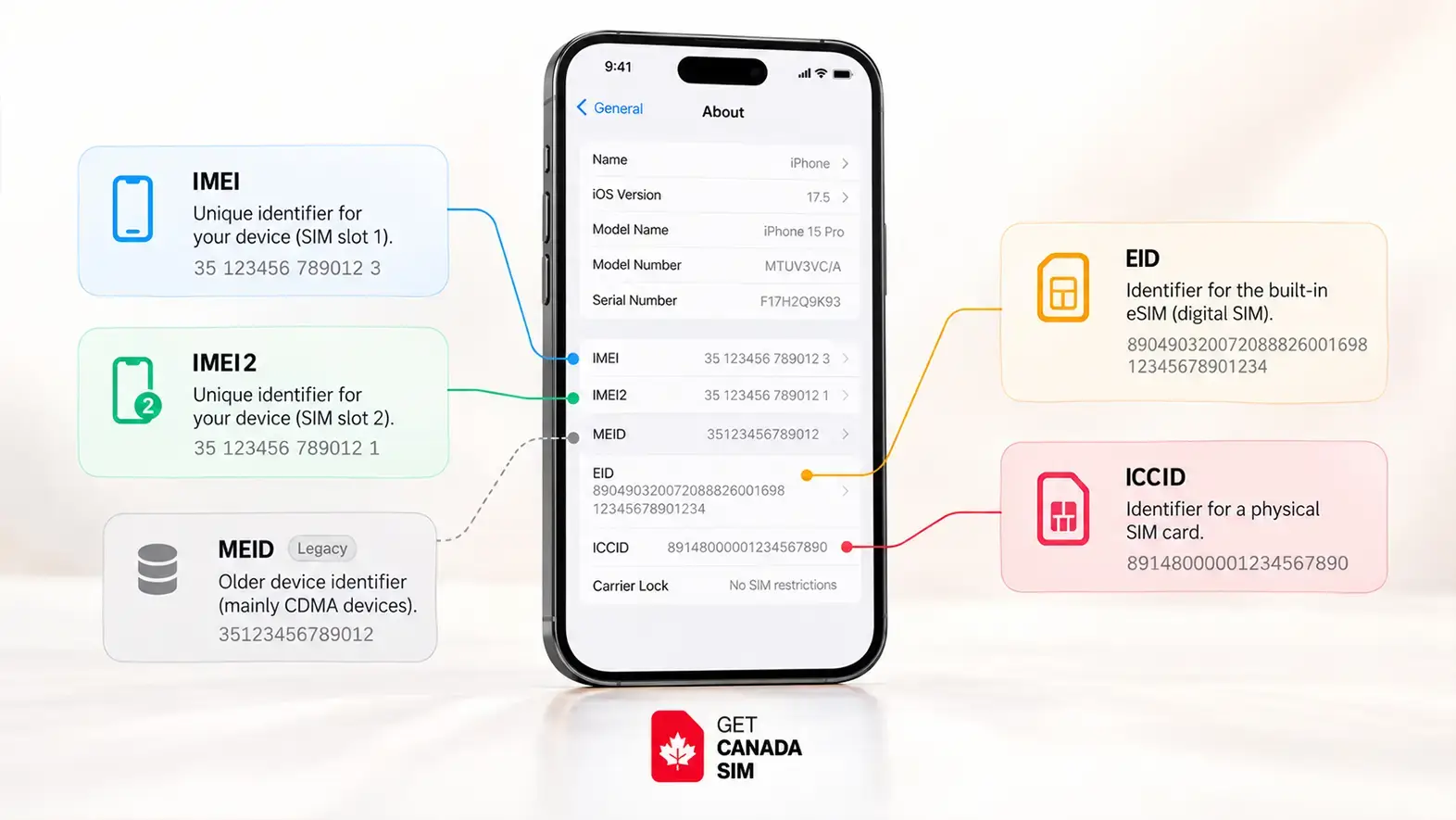
Quick Answer: MEID vs EID vs IMEI vs ICCID
IMEI, EID, ICCID, and MEID are different identifiers used for your phone, SIM, and eSIM.
- IMEI — 15 digits: identifies your phone’s cellular device/interface.
- EID — 32 digits: identifies the embedded eSIM hardware, or eUICC, inside your device.
- ICCID — 19–20 digits: identifies a specific physical SIM or eSIM profile.
- MEID — 14 hexadecimal characters: identifies mobile equipment on older CDMA-based systems.
- IMEI2 — 15 digits: identifies a second cellular interface on many Dual SIM phones.
The simplest way to remember them is:
| Identifier | What It Identifies | Typical Length |
|---|---|---|
| IMEI | Phone / device | 15 digits |
| EID | eSIM hardware | 32 digits |
| ICCID | SIM or eSIM profile | 19–20 digits |
| MEID | older mobile-device identifier | 14 hexadecimal characters |
The GSMA specifies IMEI as a 15-digit identifier, EID as a 32-digit eUICC identifier, and ICCID as a 19- or 20-digit identifier used for a SIM/eSIM profile.
How to Find These Numbers on an iPhone
Go to:
Settings → General → About
Scroll down to find the EID, IMEI/MEID, and ICCID available for your device. Apple confirms these identifiers can be found from the iPhone’s About screen.
You can also try dialing:
*#06#
on supported phones to display device identifiers such as the IMEI and, on some devices, the EID.
Important: Having an EID is a strong sign that your phone contains eSIM hardware, but it does not automatically guarantee compatibility with every carrier or eSIM plan.
---------------------------------------------------------------------------------
Now, if you open your phone's settings, you may see IMEI, IMEI2, EID, ICCID, and sometimes MEID listed together.
They may look like similar serial numbers, but they identify different things.
The easiest way to remember them is:
| Identifier | What it identifies | Typical length | Common use | Typical uses | Changes |
|---|---|---|---|---|---|
| IMEI | Your phone’s cellular device/interface | 15 digits | Device and network identification | Compatibility checks, device status, lost/stolen checks | Normally remains with the device |
| IMEI2 | A second cellular identity on a Dual SIM phone | 15 digits | Second cellular line identification | Second SIM/eSIM activation and compatibility checks | Normally remains with the device |
| EID | The eSIM hardware built into the device | 32 digits | eSIM provisioning and management | eSIM setup, carrier provisioning, troubleshooting | Normally remains with the eSIM hardware |
| ICCID | A physical SIM or individual eSIM profile | Usually 19–20 digits | SIM/profile identification | Identifying a physical SIM or eSIM profile | Changes when you use a different SIM or eSIM profile |
| MEID | A mobile device on older CDMA-based systems | 14 hexadecimal characters | Legacy device identification | Identifying older CDMA devices | Normally remains with the device |
So, EID and ICCID are not the same thing, MEID and IMEI are not exactly the same thing, and finding an IMEI alone does not tell you whether your phone supports eSIM.
If you're mainly trying to find out whether your phone supports eSIM, start with our guide on how to know if your phone supports eSIM.
What Is an IMEI Number?
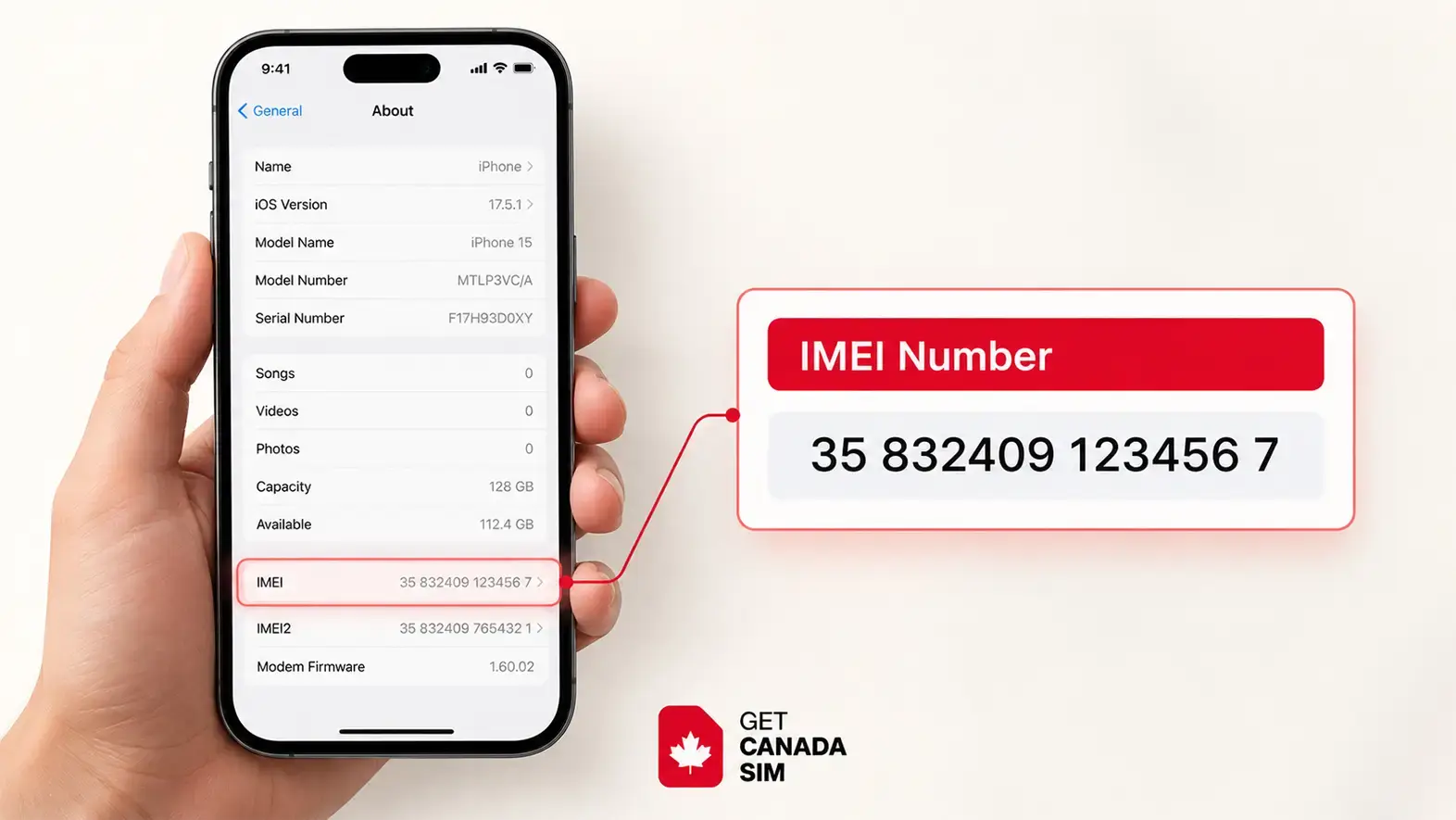
IMEI stands for International Mobile Equipment Identity.
It is normally a 15-digit number used to identify cellular equipment on a mobile network. The GSMA explains that an IMEI contains a Type Allocation Code, serial-number portion and check digit. The first eight digits, known as the TAC, can identify the device model and manufacturer information.
Think of the IMEI as an identity for the phone's cellular side rather than an identity for your phone number or SIM card.
That distinction is important.
If you remove your SIM and insert another one, the SIM subscription changes, but the phone's IMEI does not normally change.
What is an IMEI used for?
Carriers and mobile networks can use an IMEI to recognize a device and determine information about its model and network capabilities. Device-status systems may also use an IMEI to determine whether a phone has been reported lost or stolen.
If you're planning to bring a phone to Canada, an IMEI can therefore be useful during compatibility and device-status checks.
Our Canada phone compatibility and IMEI guide explains the checks worth making before you travel.
What Is an EID Number?
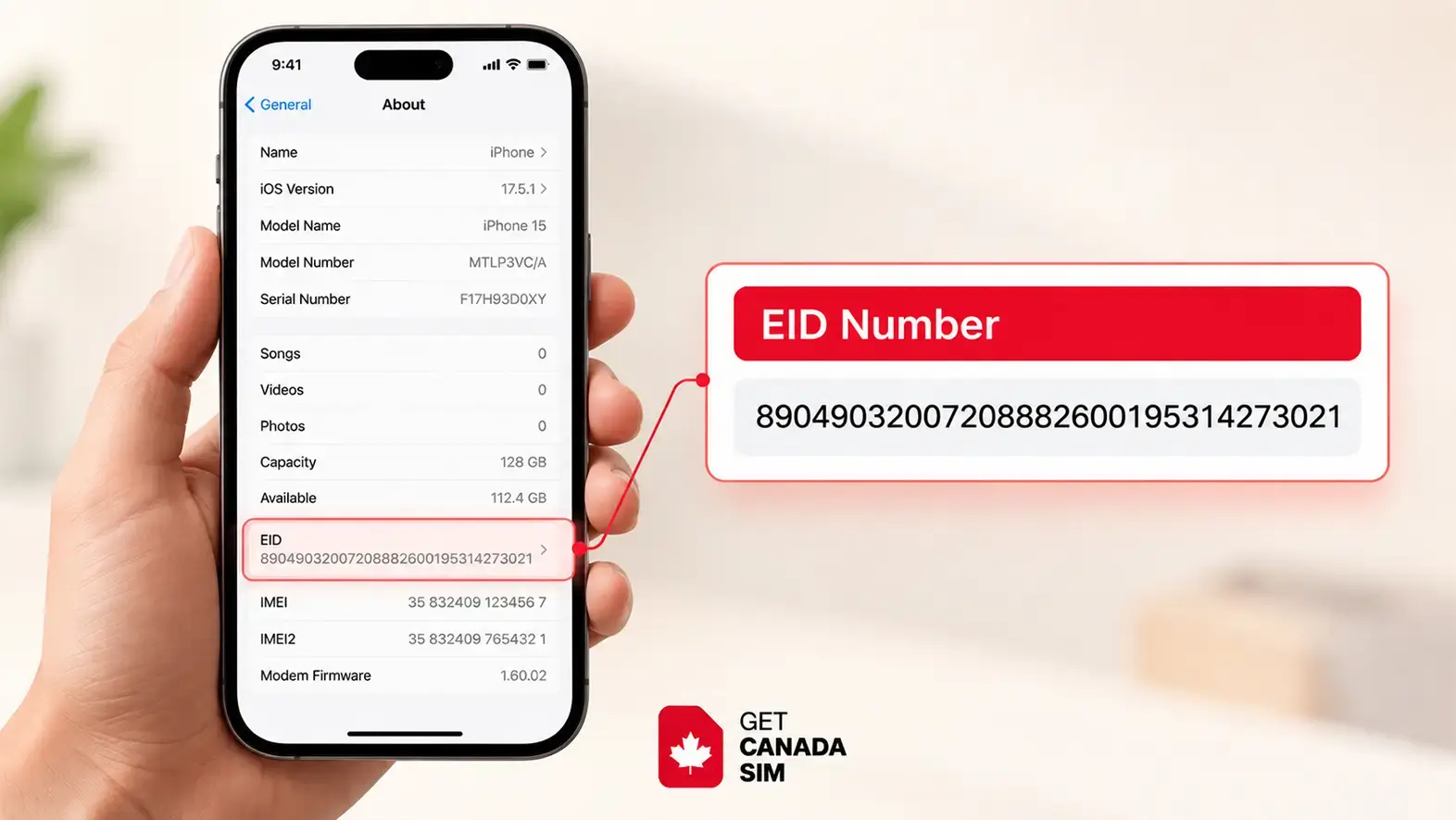
EID is the identifier associated with the eUICC, the embedded component used for eSIM.
An EID is generally a 32-digit identifier associated with that embedded SIM hardware.
This is why the EID becomes important when eSIMs are involved.
Your phone may support several downloadable eSIM profiles over its lifetime, but the underlying embedded SIM hardware has its own EID. The GSMA maintains a specific EID assignment specification for eSIM systems.
A useful way to think about it is:
IMEI = phone's cellular identity
EID = embedded eSIM hardware identity
Does an EID mean your phone supports eSIM?
Finding an EID is a strong indication that the device has eSIM hardware.
Google states that a phone needs an EID to use eSIM.
However, you should not use the EID alone as a guarantee that any specific eSIM will work.
Your exact device model, regional version, carrier support and carrier-lock status can also matter.
You can check supported models in our eSIM compatible devices list.
What Is an ICCID Number?
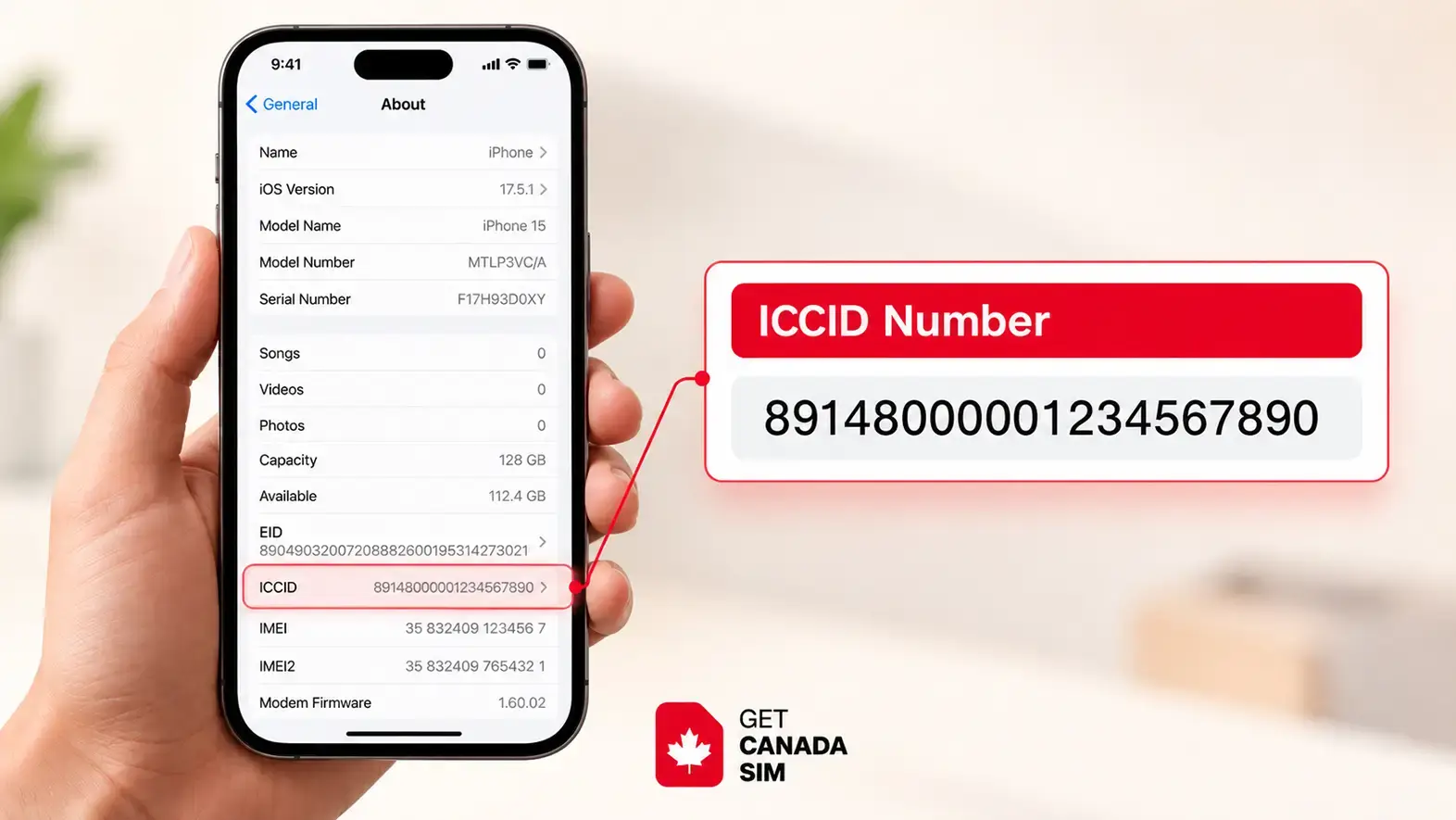
ICCID stands for Integrated Circuit Card Identifier.
Unlike the IMEI, an ICCID identifies the SIM rather than the phone.
A physical SIM has an ICCID. An installed eSIM profile can also have its own ICCID.
That means one eSIM-capable phone could have:
one EID for the embedded eSIM hardware
but
different ICCIDs for different eSIM profiles installed on it.
This is one of the easiest ways to understand the difference between EID vs ICCID.
EID vs ICCID
| EID | ICCID |
|---|---|
| Identifies the embedded eSIM hardware | Identifies a SIM or eSIM profile |
| Associated with the device's eUICC | Associated with a mobile subscription |
| Does not change each time you install a new profile | A different SIM/profile can have a different ICCID |
| Mainly relevant to eSIM-capable devices | Used with both physical SIMs and eSIM profiles |
So if you're asking “Are EID and ICCID the same thing?”, the answer is no.
The EID identifies the eSIM hardware. The ICCID identifies a SIM or eSIM profile using that hardware.
If you want to understand how a removable SIM differs from eSIM, see our guide to what a physical SIM card is and how it works.
What Is an MEID Number?
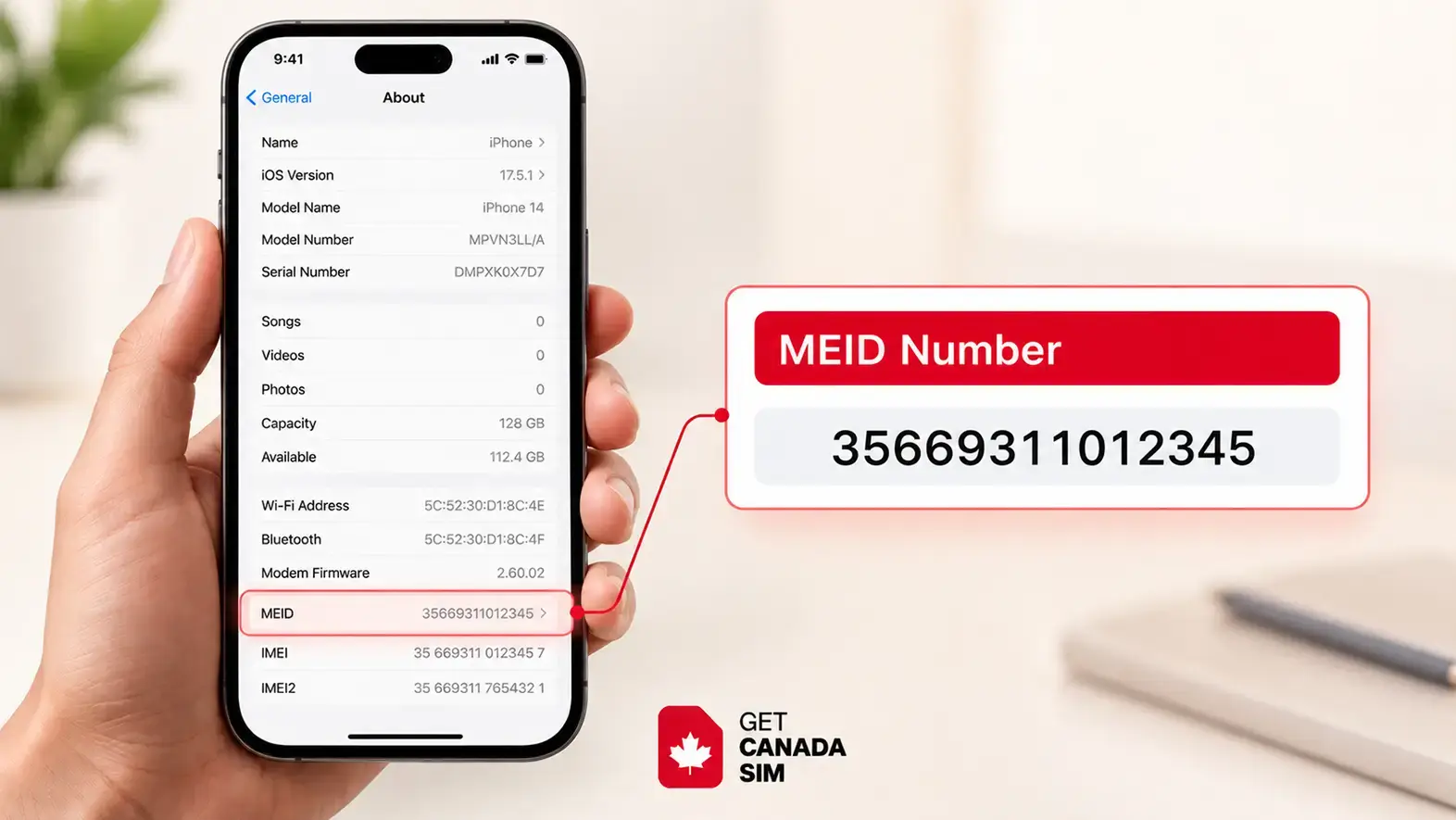
MEID stands for Mobile Equipment Identifier.
Like IMEI, MEID identifies mobile equipment rather than a SIM subscription.
MEID was particularly associated with CDMA-based mobile networks and devices.
As modern networks have moved toward LTE and 5G systems that use IMEI-based identification, MEID is much less important for most new phones and everyday eSIM setup.
You may still see IMEI/MEID grouped together in older device documentation or on Apple support pages. Apple, for example, may display IMEI/MEID alongside EID and ICCID in device information.
MEID vs IMEI: Are They the Same?
Not exactly.
Both are identifiers for mobile equipment, but they were developed for different network technologies.
| IMEI | MEID |
|---|---|
| Common on modern mobile devices | Mainly associated with legacy CDMA systems |
| Usually 15 digits | Different identifier format |
| Widely used on LTE and 5G networks | Less relevant on modern networks |
| Commonly used for device and network checks | Mainly encountered on older devices |
For most people buying or activating a modern phone today, IMEI is the identifier they are more likely to need.
Is MEID the Same as EID?
No.
This distinction is especially important if you're searching for MEID vs EID vs IMEI because their names look similar.
MEID identifies mobile equipment.
EID identifies the embedded eSIM system.
Having an MEID does not mean that a phone supports eSIM.
Does MEID Mean eSIM Compatible?
No.
An MEID is not an eSIM compatibility indicator.
If you're trying to check eSIM support, the EID is much more relevant.
A practical eSIM check is to look for an EID, look for an Add eSIM or similar option in your mobile settings, and then confirm your exact model with the manufacturer or carrier.
Our full guide explains how to check whether your phone supports eSIM.
Can You Use an MEID for eSIM?
Usually, MEID is not the identifier used to establish that a phone supports eSIM.
An eSIM-capable device has an EID associated with its embedded eSIM hardware.
A carrier may also ask for an IMEI or IMEI2 during activation, depending on the device and network. Google, for example, says a carrier may require IMEI1, IMEI2 or EID when setting up a SIM or eSIM.
So if a carrier asks for a particular identifier, use the exact number it requests rather than substituting an MEID, IMEI or EID yourself.
Why Does My Phone Have IMEI and IMEI2?
Dual SIM phones can have two IMEI numbers.
They are normally shown as:
IMEI
and
IMEI2
or:
IMEI 1
and
IMEI 2
They allow the phone to provide separate cellular identities for different SIM configurations.
Google explains that Pixel phones capable of using a physical SIM and eSIM can have two IMEI numbers. IMEI1 is usually associated with the first SIM configured, although the carrier should confirm which IMEI it needs.
This is why you may see two IMEI numbers even when there is only one physical SIM tray.
The other mobile identity may be available for an eSIM or another supported Dual SIM configuration.
Does It Matter Whether You Use IMEI or IMEI2?
Yes, it can.
If a carrier asks for the IMEI associated with a particular SIM or eSIM line, giving the wrong one can cause unnecessary confusion during compatibility checking or activation.
On some devices, the eSIM may be associated with IMEI2. On others, the relationship can depend on how the device and lines have been configured.
Google specifically notes that a carrier providing an eSIM for Dual SIM use may ask for IMEI2.
The safest rule is simple:
If your carrier asks for an IMEI, give it the IMEI specifically associated with the line or SIM configuration it is asking about.
Do not assume IMEI1 always means physical SIM and IMEI2 always means eSIM across every phone.
Which IMEI Should I Use for a Physical SIM?
There is no universal rule that works for every Dual SIM device.
On some phones, IMEI1 may correspond to the first physical SIM configuration. But SIM-to-IMEI mapping can depend on the device and how its SIMs are configured.
If a carrier needs an IMEI for activation, check your phone's SIM settings or ask the carrier which IMEI it requires.
Google notes that IMEI1 is usually paired with the first SIM configured on supported Pixel devices, but recommends confirming with the carrier.
IMEI, EID and ICCID on iPhone
An iPhone can show several identifiers in the same Settings screen, which is one reason people often confuse them.
Apple says you can find supported identifiers under:
Settings → General → About
Depending on the device and configuration, this page can show the serial number, EID, IMEI/MEID and ICCID.
Here's what they mean when you see them together:
| iPhone identifier | Meaning |
|---|---|
| IMEI / IMEI2 | Identifies cellular device interfaces |
| EID | Identifies the embedded eSIM hardware |
| ICCID | Identifies an installed SIM/eSIM profile |
| MEID | Legacy mobile equipment identifier on applicable models |
| Serial number | Apple's device serial identifier |
So an IMEI and EID number on an iPhone are not two versions of the same thing.
They identify different parts of the mobile setup.
How to Find IMEI, EID, ICCID or MEID on iPhone
Open:
Settings → General → About
Then scroll down.
Apple says this area can display the EID, IMEI/MEID and ICCID where applicable.
The numbers may also be available through Apple's device/account tools or on original packaging.
For the IMEI specifically, you can also try dialing:
*#06#
Many phones immediately display their device identifiers.
How to Check an EID Number
If you're doing an EID number check, start in the phone's own settings.
On many phones you can also dial:
*#06#
and look for EID.
However, not every phone displays every identifier through that code.
If the EID does not appear there, check the device's About or SIM settings and then verify the specifications for your exact model.
Finding an EID is useful when checking eSIM hardware, but remember:
EID present ≠ guaranteed compatibility with every eSIM provider.
How to Check an MEID
On devices that still show an MEID, you may find it in the same About screen as the IMEI.
On an iPhone, Apple recommends:
Settings → General → About
and looking for the IMEI/MEID information.
For modern devices, you will usually deal with the IMEI far more often than the MEID.
Are SIM Cards Tied to an IMEI?
A SIM card and an IMEI identify different things.
The SIM identifies the mobile subscription, while the IMEI identifies the device using it.
When a SIM is active in a phone, the mobile network can associate that subscription with the device's IMEI. The GSMA describes the network as associating the device identifier with the mobile subscription currently being used in the device.
But this does not mean the SIM permanently belongs to that IMEI.
A physical SIM can usually be moved to another compatible, unlocked device. The subscription stays with the SIM, while the new phone presents a different IMEI to the network.
Can a Phone Work Without an ICCID?
It depends on what you mean by “work.”
A phone can still turn on, use Wi-Fi, run apps, take photos and perform many other functions without an active SIM.
But normal cellular service requires a valid mobile subscription.
A physical SIM or active eSIM profile normally has an ICCID identifying that SIM/profile.
Google explains that without an active nano-SIM or eSIM, a Pixel phone will show that no SIM is present rather than connecting normally to cellular service.
Can IMEI Tell You What Carrier a Phone Uses?
Not reliably by itself.
An IMEI can reveal information associated with the device model because part of the IMEI identifies the device type.
But IMEI is a device identifier, not your current mobile subscription identifier.
A phone may have been sold by one carrier, later unlocked, and then used with several other carriers.
So you should not assume that an IMEI by itself always tells you which carrier currently provides service.
If you are trying to use another carrier, checking whether the phone is unlocked is more useful. See our guide on using eSIM on a locked phone.
Does IMEI Tell You Who Owns the Phone?
Not by itself.
An IMEI identifies a device.
It is not a public record containing the owner's name, address or personal details.
A carrier may internally associate a device IMEI with a customer account while that device is being used on its network, but knowing an IMEI alone does not normally let another person look up the owner's identity.
What Can Someone Do With Your IMEI or IMEI2?
Your IMEI is not a password, but you should still treat it as device information rather than posting it publicly.
An IMEI may be used for legitimate functions such as device identification, network checks, support or lost/stolen-device systems.
Knowing your IMEI alone does not normally give someone access to your photos, messages, passwords or SIM account.
Still, only provide an IMEI or IMEI2 to a carrier, manufacturer, trusted service provider or another party when there is a legitimate reason.
Why Does My Phone Have Two SIM Numbers?
People often use “SIM number” to refer to several different identifiers.
If your phone supports Dual SIM, you may see two mobile lines, multiple ICCIDs, two IMEIs, or a combination of physical SIM and eSIM information.
They are not duplicates.
Each identifier may correspond to a different device interface, SIM card or eSIM profile.
For Dual SIM users, our guide to using Dual SIM in Canada explains how a home-country line and Canadian line can coexist on supported phones.
Does Removing a SIM Card Delete Everything?
No.
Removing a physical SIM does not normally erase your phone.
Your photos, apps, device settings and most other data remain on the phone.
What changes is access to the mobile subscription associated with that SIM.
You may temporarily lose calls, texts and cellular data on that line until the SIM is inserted again or another mobile service is activated.
Information stored specifically on an old SIM can be different, but modern smartphones generally store most personal content on the phone or in cloud accounts rather than on the SIM itself.
Why Is Changing an IMEI Restricted or Illegal in Some Places?
IMEIs are designed to provide stable identities for mobile devices.
They are used for purposes such as device recognition and lost/stolen-device blocking. Changing or cloning an IMEI can therefore interfere with systems designed to identify or block devices.
However, the law is not identical in every country.
So it is better not to make the blanket statement that “changing IMEI is illegal everywhere.”
Local laws may prohibit IMEI alteration, cloning, fraud or related conduct under different rules.
For normal users, there is rarely a legitimate reason to modify the IMEI assigned by the manufacturer.
IMEI vs EID vs ICCID vs MEID: Which One Do You Actually Need?
Here is the simplest decision table:
| What are you trying to do? | Identifier most likely to matter |
|---|---|
| Identify your phone | IMEI |
| Check device/network compatibility | IMEI |
| Check lost/stolen device status | IMEI |
| Determine whether eSIM hardware is present | EID |
| Set up or troubleshoot an eSIM | EID and sometimes IMEI/IMEI2 |
| Identify a physical SIM | ICCID |
| Identify an eSIM profile | ICCID |
| Work with an older CDMA device | MEID |
| Set up Dual SIM | IMEI1/IMEI2, EID and SIM information may matter |
The key is not to ask, “Which number is the most important?”
Instead ask:
“What am I trying to identify?”
The phone itself? Look at IMEI.
The eSIM hardware? Look at EID.
The SIM or eSIM profile? Look at ICCID.
An older CDMA device? You may encounter MEID.
Learn more from Reddit.
MEID vs EID vs IMEI vs ICCID for eSIM
If your main reason for comparing these numbers is eSIM, focus on EID and IMEI first.
An EID tells you that eSIM hardware is present.
The IMEI identifies the device on the cellular network.
Once an eSIM profile is installed, that profile has an ICCID.
MEID is generally not what determines eSIM support.
Before buying any eSIM, also make sure your exact device variant supports eSIM and that the phone is not restricted to another carrier.
You can work through those checks in our eSIM compatibility guide.
What If You're Bringing Your Phone to Canada?
If you plan to use your current phone in Canada, knowing the identifiers is useful, but it is only one part of the compatibility check.
You should verify:
device compatibility → SIM/eSIM support → carrier-lock status → network compatibility → plan compatibility
An EID can help establish that your phone has eSIM hardware, while the IMEI can help with device identification and compatibility checks.
If you prefer a removable SIM, you can also compare eSIM vs physical SIM for newcomers to Canada.
Once you know which format your phone supports, you can compare Canadian SIM and eSIM plans based on your actual needs.
Frequently Asked Questions
Are EID and ICCID the same thing?
No. EID identifies the embedded eSIM hardware, while ICCID identifies a particular physical SIM or eSIM profile.
Is EID the same as IMEI?
No. IMEI identifies cellular equipment. EID identifies the embedded eSIM hardware.
Is an MEID number the same as an EID number?
No. MEID is a mobile-device identifier associated mainly with older CDMA systems. EID identifies eSIM hardware.
Are MEID and IMEI the same?
They have similar purposes because both identify mobile equipment, but they are different identifier systems. IMEI is the one you will usually encounter on modern LTE and 5G phones.
Does MEID mean eSIM compatible?
No. Look for an EID and the device's eSIM settings instead.
Can I use MEID for eSIM?
Do not assume so. A carrier setting up eSIM may request an EID, IMEI or IMEI2 depending on the device and activation process. You can know more from Apple.
Does it matter if I use IMEI or IMEI2?
It can. Use the IMEI associated with the line or SIM configuration your carrier is asking about.
Which IMEI number should I use, 1 or 2?
Use the one associated with the SIM/eSIM being activated or checked. If it is unclear, confirm with your carrier rather than guessing.
Which IMEI should I use for a physical SIM?
This varies by device. IMEI1 often corresponds to the first SIM configuration, but do not assume that rule applies universally.
Why do I have two IMEI numbers with one SIM card?
Your phone may support Dual SIM even if only one physical card is installed. The second IMEI can support another cellular line or eSIM configuration.
Are SIM cards tied to IMEI?
Not permanently. The network can associate an active SIM subscription with the IMEI of the device currently using it, but the SIM and IMEI identify different things.
Can a phone work without an ICCID?
It can work over Wi-Fi and perform normal offline functions, but cellular service generally requires an active SIM or eSIM profile.
Can IMEI tell me what carrier a phone is on?
Not reliably. IMEI identifies the device, not the current subscription.
Does IMEI tell you who owns the phone?
No. The IMEI itself does not publicly reveal the owner's identity.
What can someone do with my IMEI2 number?
IMEI2 is another device identifier. It does not provide direct access to your photos, accounts or messages, but there is usually no reason to publish it publicly.
Does removing my SIM card delete everything?
No. Removing a SIM does not normally erase the phone's apps, photos, files or settings.
Final Takeaway
MEID, EID, IMEI and ICCID are not competing versions of the same number.
They identify different parts of your mobile setup:
IMEI identifies the phone's cellular device identity.
EID identifies the embedded eSIM hardware.
ICCID identifies a SIM or eSIM profile.
MEID identifies mobile equipment mainly associated with older CDMA technology.
And if your phone has IMEI1 and IMEI2, that usually means it supports more than one cellular identity or SIM configuration.
For eSIM users, the most useful combination to understand is:
EID → eSIM hardware
IMEI/IMEI2 → device identity
ICCID → installed SIM/eSIM profile
Once those three differences are clear, most of the confusing numbers inside your phone settings start to make sense.
Other blog posts you may find useful:
- Cheapest Cell Phone Plan in Canada: Your Questions Answered
- Cheapest Prepaid SIM Card Canada: Best Low-Cost Plans
- Best eSIM for Canada in 2026: Plans, Prices & Providers
- eSIM vs Physical SIM Signal Strength
- How to Check If My Phone Is Unlocked in Less than a Minute
- Best Postpaid SIM Cards in Canada for Newcomers
- How Much Mobile Data Do I Need in Canada?
- How to Choose a Phone Plan in Canada Without Overpaying
Follow Get Canada Sim on Google
Make Get Canada Sim a preferred source to find our latest Canada SIM and eSIM guides in Google Search.