

Does Canada Sell the iPhone 17 Pro as eSIM Only?
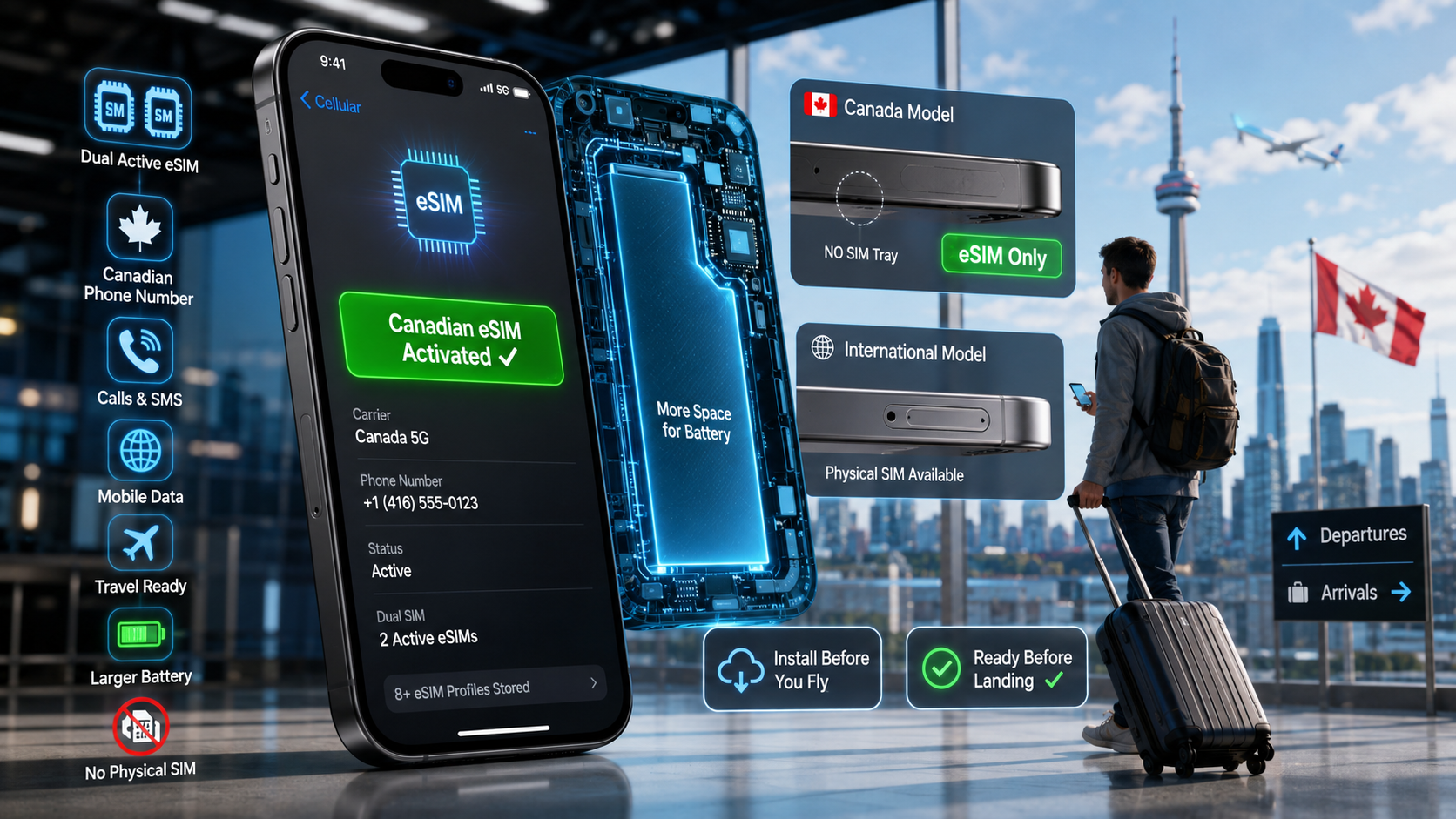
Yes. iPhone 17 Pro and 17 Pro Max models sold in Canada have no physical SIM tray — eSIM is the only way to activate service on them. Each supports two active eSIMs and stores eight or more profiles. Apple used the freed-up space for a larger battery, so Canadian units differ physically from tray models sold in some other regions.
If eSIM itself is new to you, start with our guide to what an eSIM is and how it works in Canada. The important point here is simple: a Canadian iPhone 17 Pro does not accept a physical SIM card.
Quick answer
| Question | Canadian iPhone 17 Pro / Pro Max |
|---|---|
| Physical SIM tray | No |
| eSIM support | Yes |
| Two active eSIMs | Yes |
| Stores multiple eSIMs | Eight or more |
| Can use a physical Canadian SIM | No |
| Can keep two eSIM lines active | Yes |
| Can use a Canadian mobile plan | Yes, if the provider and plan support eSIM |
What changed
This is the first iPhone generation Apple has sold in Canada without a SIM tray. Previous generations offered both a nano-SIM slot and eSIM; the 17 series dropped the slot entirely in Canada, joining the US and a list of other eSIM-only markets.
The battery difference is the part people miss. Apple ships the same model with different battery capacities depending on region, because the eSIM-only variant fills the space the tray used to occupy. That's a genuine, if small, advantage for Canadian buyers.
This also means the phrase “iPhone 17 Pro” alone does not tell you whether a phone has a SIM tray. The country or region where that particular device was originally sold matters.
What it means practically
You can't insert a SIM card. Not a Canadian one, not your home one, not a spare from a friend. Every line on the phone is a digital profile you download.
For most people that's simpler, not harder. But three situations need planning:
- You're flying to Canada and want a number on arrival. Install the eSIM before you board, while you still have internet.
- You want to keep your home number. Two active eSIMs means you can, provided your home carrier issues an eSIM. Some still only issue physical SIMs — check before you assume.
- You planned to buy a SIM at a kiosk on landing. Not possible on this phone. Arrange the eSIM ahead.
If you're unfamiliar with managing two mobile lines, our guide explains how to use Dual SIM in Canada.
| eSIM-only iPhone 17 Pro (Canada) | Tray model (other regions) | |
|---|---|---|
| Physical SIM | Not supported | Supported |
| Active lines | Two eSIMs | One nano-SIM + one eSIM |
| Stored profiles | Eight or more | Eight or more |
| Battery | Larger | Smaller |
| Buy a SIM at a kiosk on arrival | No | Yes |
| Nano-SIM + eSIM | Not possible | Supported on applicable models |
| Insert a physical SIM after arrival | No | Yes, if compatible |
| Use Canadian eSIM | Yes | Yes |
Before travelling with a Canadian iPhone 17 Pro
The phone already supports eSIM, so compatibility is usually not about whether eSIM exists on the device. The more useful checks are whether the phone is unlocked, whether the mobile plan you want supports eSIM, and how that provider handles activation.
Before flying:
- Check that the iPhone is unlocked. Go to Settings → General → About and look for Carrier Lock. If you're unsure what it means, see how to check and unlock your phone before travelling to Canada.
- Check your home carrier if you want to keep your existing number. If that number is currently on a physical SIM, ask whether it can be moved to an eSIM.
- Get your Canadian eSIM activation details before travel.
- Use reliable internet for installation. Wi-Fi at home is easier than trying to troubleshoot the setup after a long flight.
- Do not delete an existing working eSIM until you know whether you still need it.
For the actual iPhone screens and activation methods, see our complete guide on how to activate eSIM on iPhone.
If your home number is still on a physical SIM
This deserves special attention because an eSIM-only Canadian iPhone 17 Pro has nowhere to insert that card.
If you're upgrading from an older phone and your current number still lives on a physical SIM, check whether your home carrier offers SIM-to-eSIM conversion or eSIM transfer. Availability depends on the carrier.
If conversion is not available, another option is to keep your old phone for that physical SIM while using the iPhone 17 Pro for your Canadian eSIM. That is less convenient than having both numbers on one phone, but it avoids assuming your existing physical SIM can simply be moved into the new iPhone.
If your carrier does support transferring the line, confirm the new eSIM works before discarding or deactivating the old physical SIM.
If you bought your iPhone 17 Pro outside Canada
Then it may well have a tray, because eSIM-only is region-dependent rather than global. A unit bought in a market that still ships trays keeps the tray when you bring it to Canada — hardware doesn't change by geography.
So don't assume from the model name. Look at the edge of the phone, or dial *#06# and check for an EID. Knowing which variant you actually hold decides whether a physical SIM is even an option for you.
How to check which iPhone 17 Pro version you have
Start with the simplest check: look at the side of the phone for a SIM tray.
You can also confirm where the phone was originally purchased and check its exact model information under:
Settings → General → About
Dialling *#06# or finding an EID can help confirm that the device has eSIM capability. However, the presence of an EID does not tell you whether the phone also has a physical SIM tray, because tray-equipped iPhone 17 Pro models can support eSIM too.
If you're checking another phone or regional model, our guide shows how to know if your phone supports eSIM.
And if you want to understand what the removable version actually does, see what a physical SIM card is and how it works.
Can a Canadian iPhone 17 Pro use a physical SIM adapter?
Not in the normal sense.
A physical SIM adapter still needs a physical SIM slot to sit inside. The Canadian iPhone 17 Pro and 17 Pro Max do not have that slot, so you cannot solve the lack of a tray by inserting an adapter.
For this model, your practical mobile-service options are eSIM-based.
Getting a Canadian number on an eSIM-only iPhone
Since eSIM is your only built-in SIM option on a Canadian iPhone 17 Pro, the next question becomes which type of eSIM you need.
Many travel eSIM plans focus mainly on mobile data. Some providers now also offer voice, SMS, or phone-number options, so don't assume every travel eSIM is data-only. Check the actual plan before buying.
More importantly, check what type of number is included. A plan may provide:
- mobile data only,
- data plus app-based calling,
- a US or another international number,
- or a Canadian mobile number with calling and texting.
These are not the same product.
If you specifically want a Canadian line, compare the plan inclusions rather than choosing only by data allowance.
A Canadian carrier eSIM can provide a real 10-digit Canadian number with calls and texts when those features are included with the plan. Having a Canadian number can be convenient for local calls and messages, but it is not inherently required for banking, employment, renting a home, immigration, or university registration.
Ours activates up to 24 hours before you land, so the number works from the moment you clear customs.
Install the profile at home the night before you fly, or on airport Wi-Fi before boarding. You can't rely on having an internet connection in the air or immediately after landing, so preparing the profile beforehand removes one more thing to troubleshoot after your flight.
Our Canadian eSIM activation guide covers the setup process.
Want both numbers live? How to use Dual SIM in Canada explains running your home line and a Canadian line together — which on a Canadian iPhone 17 Pro means two eSIMs.
Ready to sort it before you fly? Compare plans. No contract, no credit check, and a real Canadian number active before you land.
On Android instead? See whether the Samsung Galaxy A17 5G supports eSIM.
What if my Canadian eSIM does not activate?
An eSIM-capable phone does not guarantee that every eSIM will activate automatically.
If your iPhone 17 Pro shows an error, check:
- whether the phone is carrier-unlocked,
- whether you have a reliable internet connection,
- whether the eSIM QR code or activation details are still valid,
- whether the eSIM has already been installed,
- whether your provider supports the plan on your device,
- and whether the line is supposed to activate immediately or closer to your arrival.
Avoid repeatedly deleting an eSIM profile while troubleshooting. Some activation codes are designed for one installation and may need to be reissued after deletion.
See how to activate eSIM on iPhone for setup and troubleshooting steps.
FAQ
Does the iPhone 17 Pro have a SIM card slot in Canada?
No. iPhone 17 Pro and 17 Pro Max models sold in Canada ship without a physical SIM tray, so eSIM is the way to activate cellular service on them. Apple used space previously occupied by the physical SIM hardware for a larger battery in its eSIM-only models.
Units purchased in regions that still sell tray-equipped versions keep their physical SIM tray when brought to Canada.
Is every iPhone 17 Pro eSIM-only?
No. SIM configuration depends on where the device was originally sold.
Canadian models are eSIM-only, while models sold in some other regions include a physical nano-SIM tray as well as eSIM support.
That is why you should check the exact device rather than assuming every iPhone 17 Pro worldwide has identical SIM hardware.
How many eSIMs can an iPhone 17 Pro hold?
It supports two active eSIMs at the same time and can store eight or more profiles, allowing you to switch between stored lines in Settings.
That can let you keep your home-country line alongside a Canadian line, provided both providers support the required eSIM setup.
Can I use two eSIMs at the same time on an iPhone 17 Pro?
Yes. The iPhone 17 Pro supports two active eSIMs.
You can, for example, keep one eSIM for your existing number and use another for Canadian mobile service. You then choose which line handles cellular data, calls, and messages in your iPhone settings.
Can I use a physical SIM and eSIM together on an iPhone 17 Pro?
It depends on where the phone was purchased.
A Canadian iPhone 17 Pro has no physical SIM tray, so the answer is no for that model.
A tray-equipped regional version can support a nano-SIM plus an eSIM, while also supporting eSIM configurations.
Can I use a Canadian eSIM on an iPhone 17 Pro bought overseas?
Yes, provided the phone supports the required eSIM configuration, is carrier-unlocked, and the Canadian provider supports the device and plan.
Regional hardware differences mainly affect the physical SIM configuration. An overseas iPhone 17 Pro may therefore offer both a SIM tray and eSIM instead of being eSIM-only.
Does an EID mean my iPhone 17 Pro has no SIM tray?
No.
An EID is associated with the phone's eSIM system. Finding an EID tells you that the device has eSIM capability; it does not prove that the phone lacks a physical SIM tray.
Look at the device itself and check where it was originally sold if you need to identify the exact SIM configuration.
Can I convert my existing physical SIM to eSIM?
Possibly. It depends on your current carrier.
Some carriers support converting an existing physical SIM to eSIM or transferring the line digitally. Others require you to contact them or receive a new eSIM.
Confirm the process with the carrier that currently holds your number before changing or discarding the physical SIM.
Should I install my Canadian eSIM before flying?
Installing the eSIM while you still have reliable internet can make the process easier.
However, installation and service activation are not always the same thing. Follow the instructions supplied with your particular plan, so you know when the profile should be installed and when the service becomes active.
Can I buy a physical SIM after landing and use it in a Canadian iPhone 17 Pro?
No. There is no SIM tray in the Canadian model, so a physical SIM card has nowhere to go.
You would need an eSIM-compatible mobile option instead.
Does the Canadian iPhone 17 Pro work outside Canada?
Yes, it can connect to compatible mobile networks outside Canada using supported eSIM service.
Before travelling, check that the phone is unlocked and that your home carrier, roaming provider, or destination provider supports eSIM for the service you want to use.
Follow Get Canada Sim on Google
Make Get Canada Sim a preferred source to find our latest Canada SIM and eSIM guides in Google Search.